 SampattiTrack
Investments, SIPs and XIRR
Create a Unit for each fund, stock or gold holding, record your purchases with quantity and price, and the Portfolio tab shows value, allocation, SIPs and XIRR.
Add a holding
A holding is something you own in units, such as a mutual fund, a stock or gold. SampattiTrack tracks each one as a Unit, then values it as quantity multiplied by the latest price. Setting one up takes two steps: create the unit once, then record each purchase.
- On Home, tap Add, then choose Unit ("Stock / MF / Currency").
- Pick the type: Mutual Fund, Stock / Demat, Gold / Metal, NPS Scheme, Currency / Forex or Custom.
- Use the search field to find the fund or stock, or type the name and symbol yourself. The symbol is how prices are looked up, such as a scheme code for a fund or a ticker for a stock.
- Leave Track Market Price on if you want prices refreshed automatically, then tap Create Unit.
Next, record what you bought. Tap Add, then Transaction. Choose the account the money came from, then use the unit menu next to the amount to pick your fund or stock. Two extra fields appear: Quantity (how many units) and Price / Unit. Save, and the holding shows up in the Portfolio tab.
Holdings are valued at the latest price times your quantity, not at what you paid. A purchase of 10,000 that is now worth 12,000 shows 12,000. The reasons are in Units and prices.
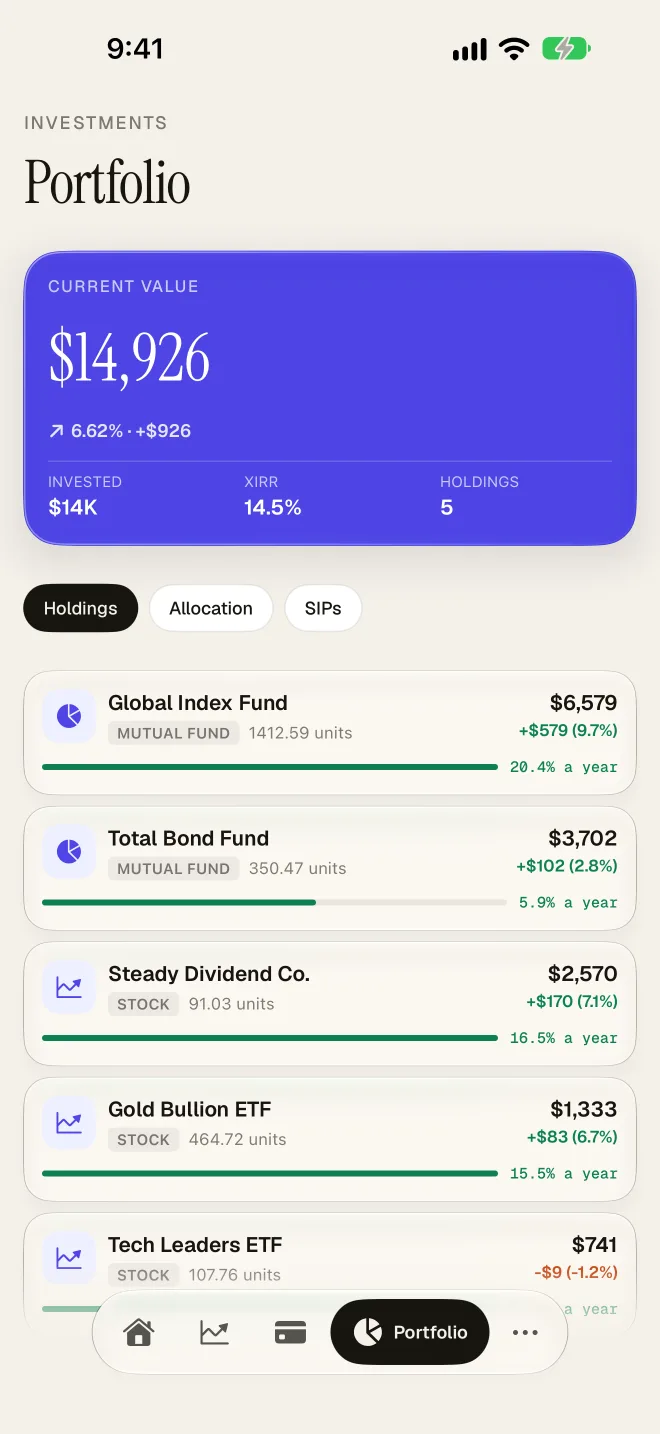
Read the Portfolio tab
Open Portfolio from the bar at the bottom. At the top you see your current value, the gain or loss, the amount invested and an overall XIRR. Below that are three tabs:
- Holdings lists each fund, stock or metal with its units, gain or loss and an annual return.
- Allocation shows how your portfolio splits across holdings, so you can see where the weight sits.
- SIPs lists your recurring monthly investments and their total per month.
Tap any holding to see its current value, total return, a chart of invested versus current value over the last year, and its trade history. Tap Edit at the top of that screen to change its details.
Set up and track a SIP
SampattiTrack detects SIPs from consistent monthly purchases of the same holding, so most of the time you do nothing. To make it happen:
- Record each instalment as a transaction into the holding, with the units you received. If you want it to post by itself, add a recurring rule for the amount.
- After a few months, open Portfolio then SIPs to see it with its monthly amount.
- If a fund is missing, open the holding, tap Edit, switch on SIP and enter the Monthly SIP amount. It then appears under SIPs even when the pattern is not detected.
How XIRR is shown
XIRR is the yearly return that matches the real dates of your purchases and the current value. It is shown as a percentage on the Portfolio summary, on each holding card as "a year", and as an XIRR row on the holding's detail screen. It is computed on your device from your transactions.
For a single lump sum with nothing else, XIRR equals the compound annual growth rate. With several SIP instalments it weighs each one by how long it was invested, so it differs from the simple gain. Treat XIRR over a few months with care: a small gain over a short period can look large when annualised. If a holding shows a dash instead of a return, it has no price yet, so check the symbol and your connection. Prices and fund search need an internet connection; everything else works offline.
Tips
- Record every purchase, sale and dividend. XIRR is only as good as the cash flows it sees.
- Use a separate account for each broker or fund house so the Portfolio tab matches your statements.
- To bring in history quickly, use CSV import.
Still stuck? Email [email protected] and include your iOS version and the app version.